
How to Implement SumUp in Laravel?
This post offers a detailed, step-by-step procedure for integrating the SumUp payment gateway into a PHP or Laravel application, without the need for any packages. While my preference leans towards Laravel, this method is equally effective for PHP or any other PHP-based framework.
Step 1 : Get API Credentials
- Navigate to the following URL and log in to dashboard : https://auth.sumup.com/
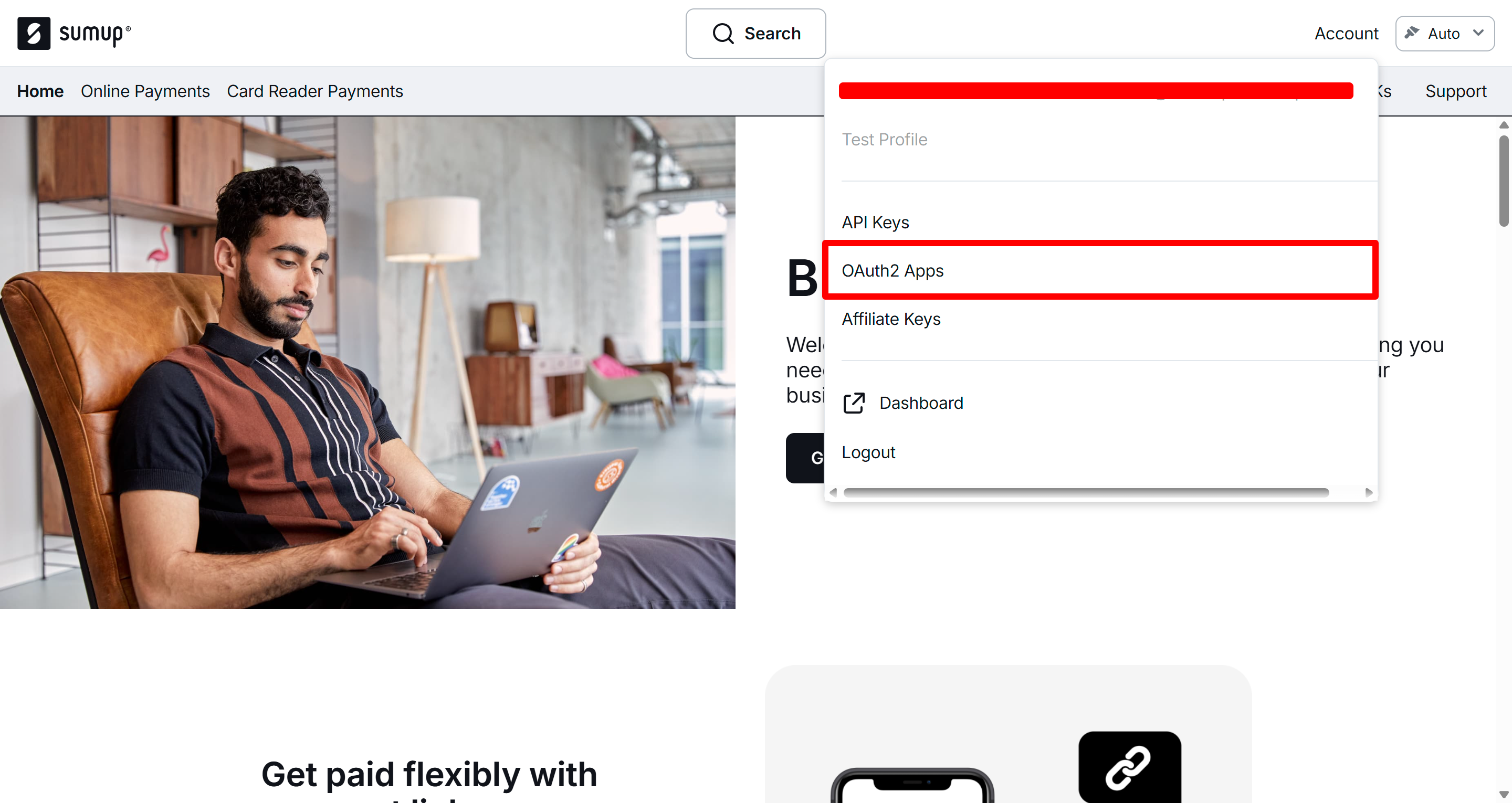
- Once you're logged in, you'll see a dropdown menu similar to the one shown below. Select OAuth2 Apps from that menu.
Note : If you are unable to fine dropdown please head to developer login : https://developer.sumup.com/
Note : If you still unable to find OAuth2 Apps, Please goto profile page or settings page and create OAuth2 applications, You will see OAuth2 option in developer settings section
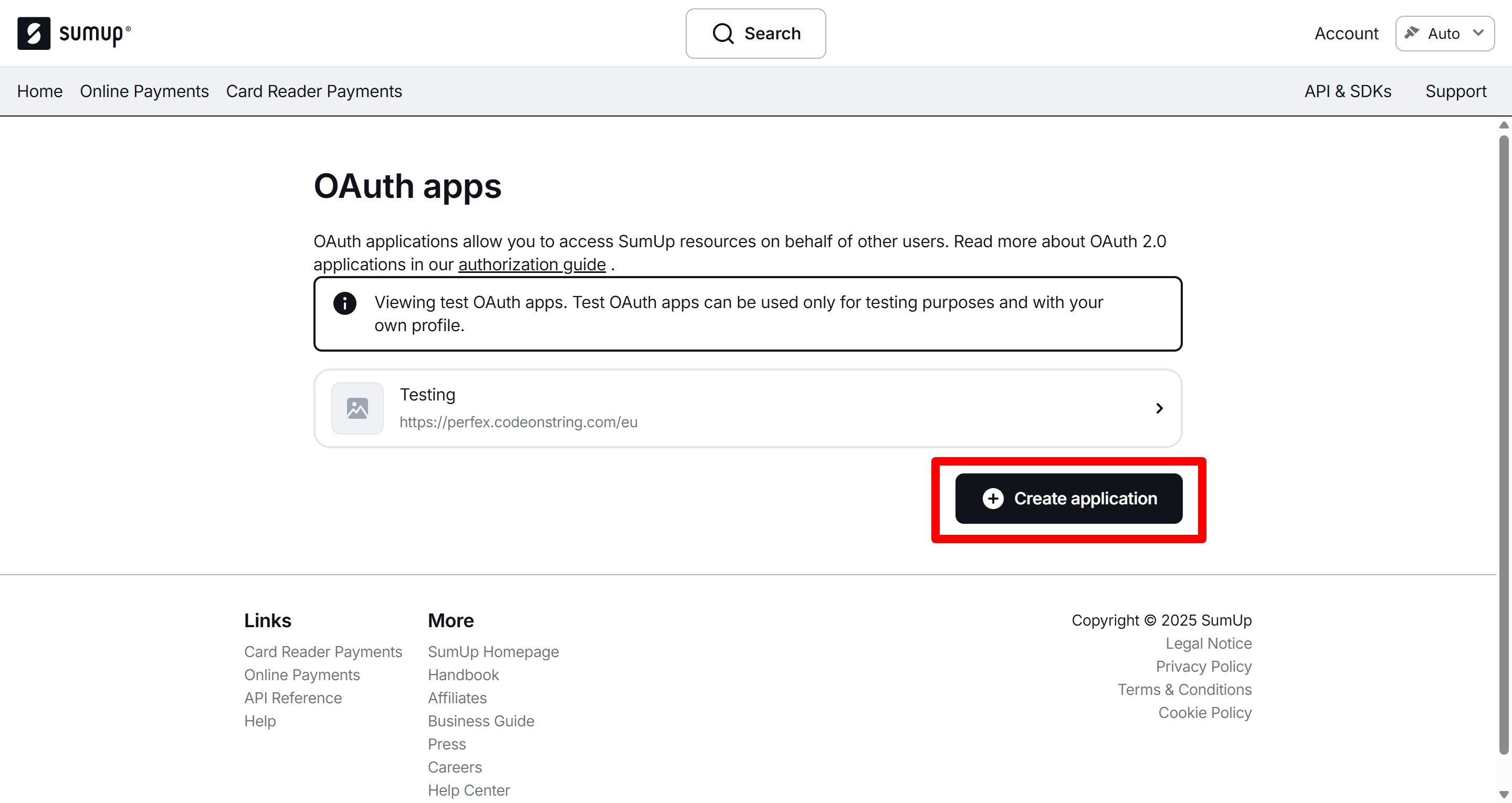
- Click on Create application
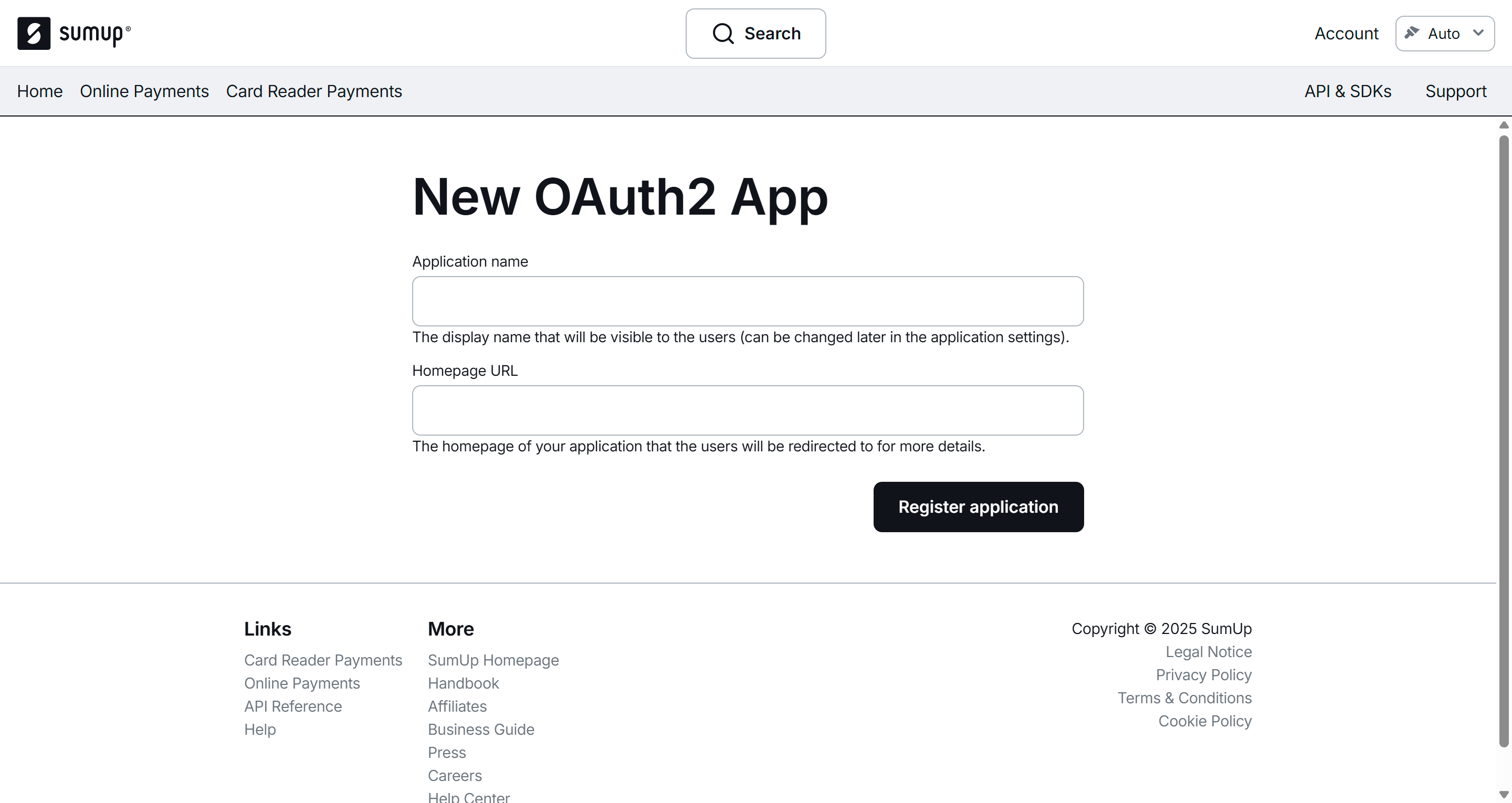
- Enter details and click on Register Application
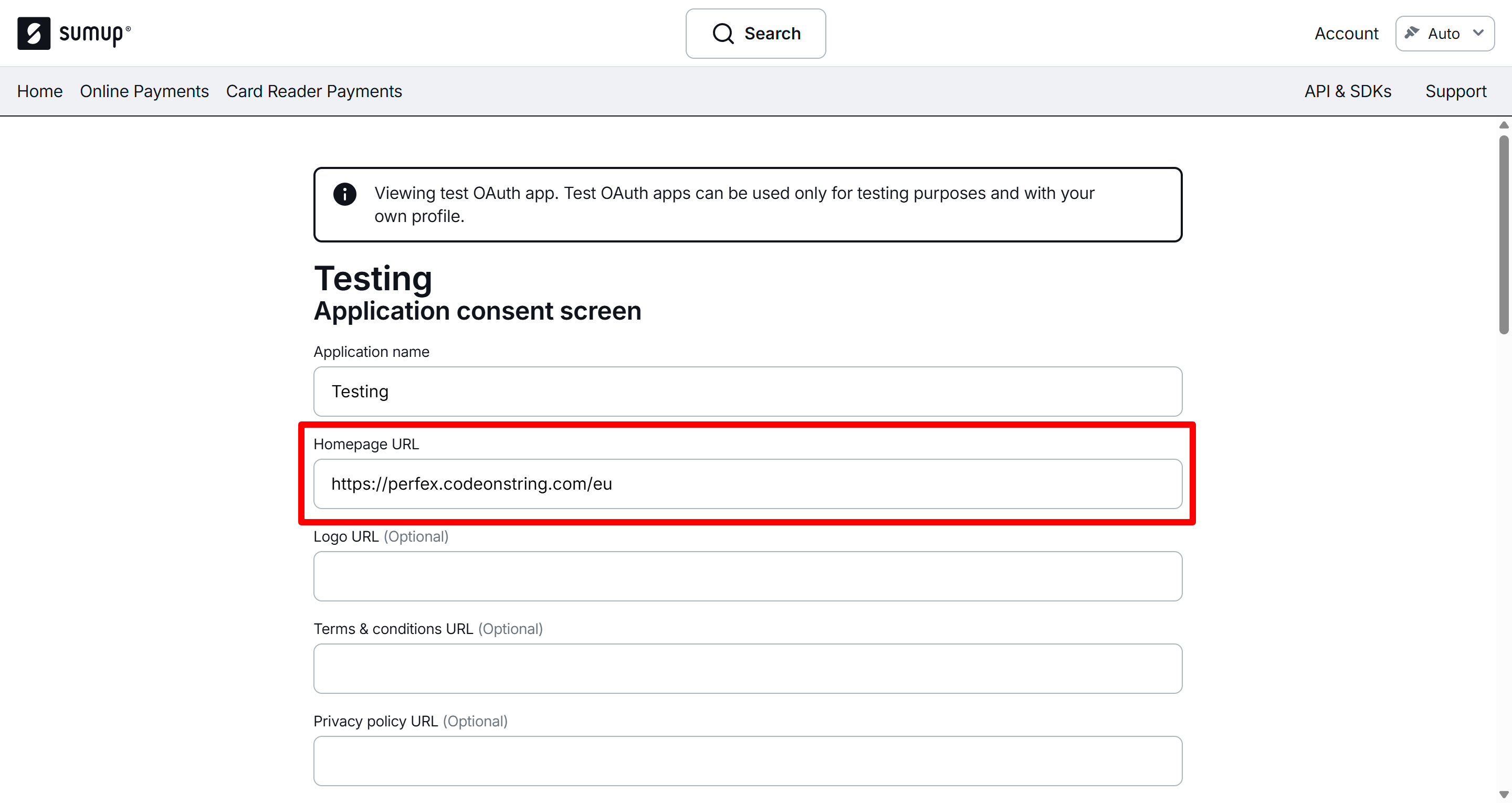
- Make sure Homepage URL is proper as SumUp will only allow request from register URL.
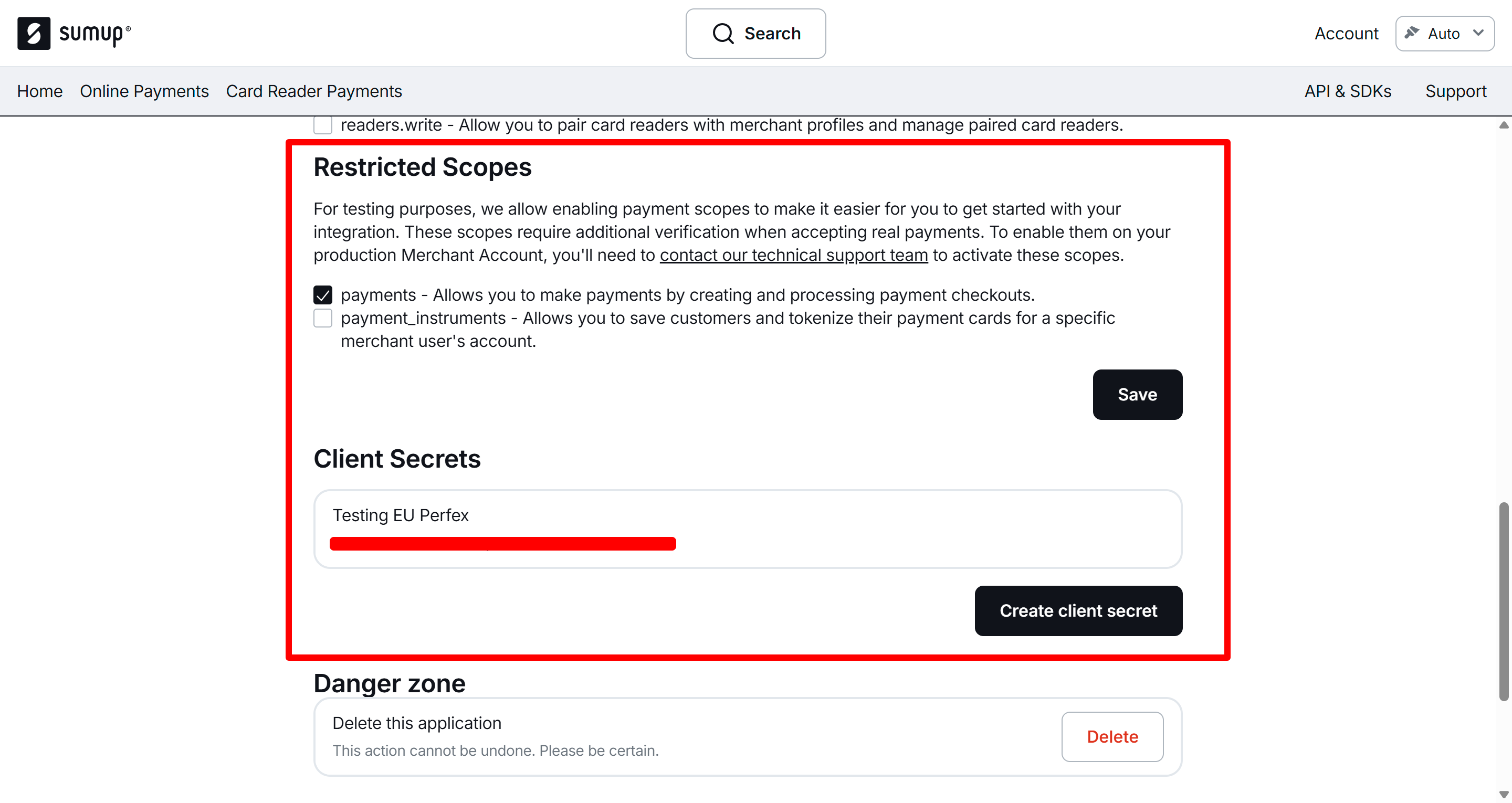
- Scroll down, Make sure in Restricted Scope, Payments scope is enabled.
- Click on Create client secret
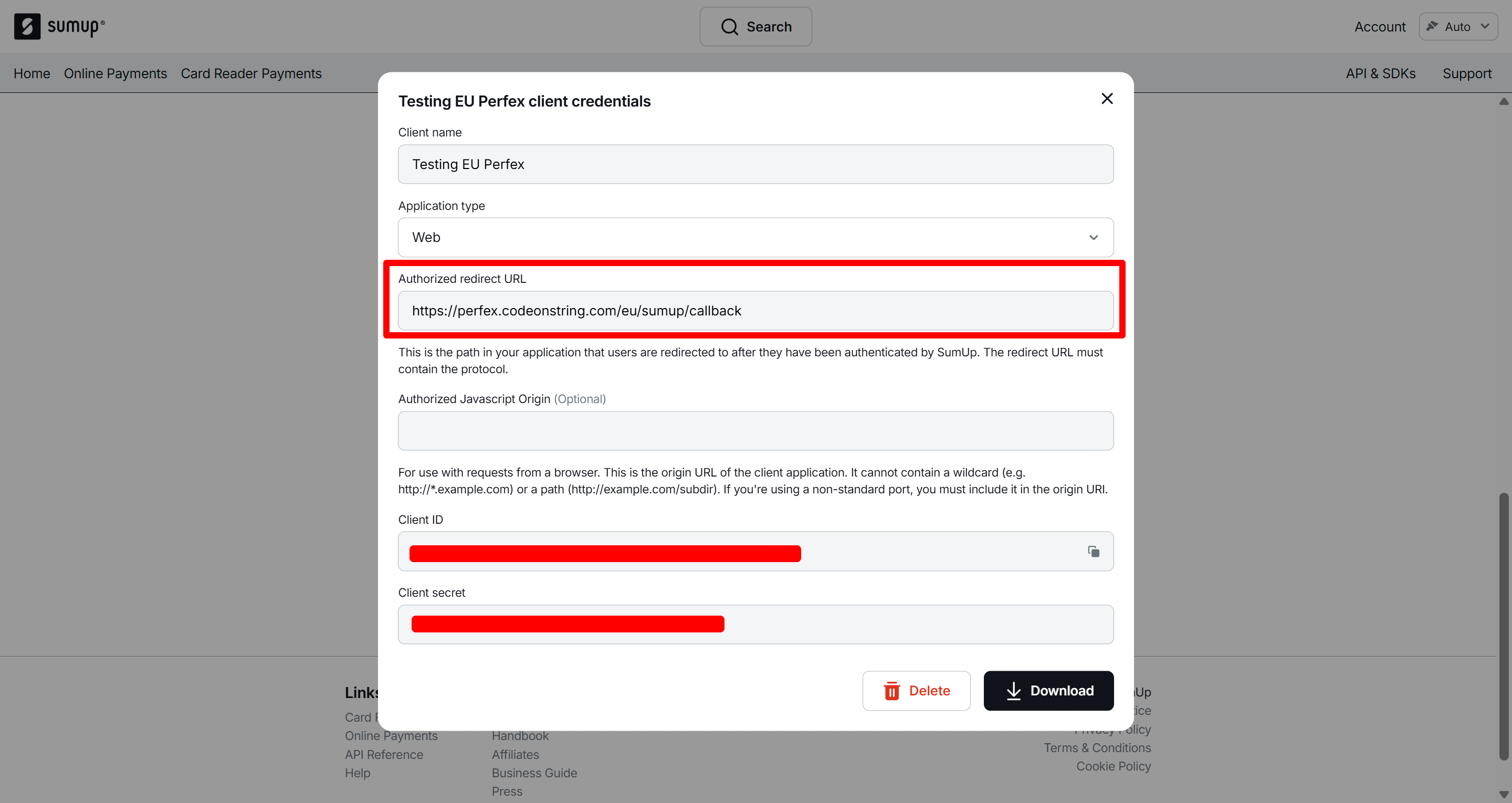
- Select Application Type as Web
- Make sure to add proper redirect URL, It should be : https://your.domain.com/sumup/callback
- Copy or download, Client ID and Client Secret
Step 2 : Create a Controller.
To create a controller please execute the provided command.
php artisan make:controller PaymentControllerStep 3 : Create Routes.
Next, we'll construct a payment form to gather the necessary details and confirmations from the user. Following this, we'll process the payment. In the callback, we'll verify the payment and determine whether it was successful. So, let's start by creating some routes in the web.php file.
// AUTHORIZATION URL / LOGIN URL
Route::get('sumup', [\App\Http\Controllers\PaymentController::class, 'index'])->name('sumup.index');
// CALLBACK URL
Route::get('sumup/callback', [\App\Http\Controllers\PaymentController::class, 'callback'])->name('sumup.callback');
// CHECKOUT URL
Route::get('sumup/checkout', [\App\Http\Controllers\PaymentController::class, 'checkout'])->name('sumup.checkout');
// CONFIRM URL
Route::post('sumup/confirm', [\App\Http\Controllers\PaymentController::class, 'confirm'])->name('sumup.confirm');Step 4 : Understand Flow
Understand the flow first, The SumUp payment gateway works a bit differently than most other gateways.
The user must log in to their SumUp account. After login, they are redirected back to the callback URL. In the callback function, we generate the token and then redirect to the checkout function. In the checkout function, we create the checkout session and display the payment widget (mainly the card widget).
In the checkout step, you can collect any additional customer details you require. Since we are using the widget provided by SumUp, the payment processing and verification are handled by SumUp itself. All we need to do on our side is save the checkout_reference and transaction_id in the database via the confirm URL.
Step 4 : Payment Form and Processing
We'll create a function named index in PaymentController.php. This function will be responsible for creating authorization url / login url.
public function index()
{
    $client_id = 'SUMUP_CLIENT_ID';

    $redirectUri = route('sumup.callback');

    $authorization_url = 'https://api.sumup.com/authorize?response_type=code&client_id='.$client_id.'&redirect_uri='.$redirectUri.'&scope=payments';

    return view('sum-up.index',compact('authorization_url'));
}Let's create a login form. To keep it minimal and easy to understand, we'll avoid extra design elements and stick to a simple, basic page.
resources/views/sum-up/index.blade.php
<!DOCTYPE html>
<html>
<head>
    <title>Pay with SumUp</title>
</head>
<body>

<h2>Pay with SumUp</h2>
<a href="{{ $authorization_url }}">Login & Authorize SumUp</a>

</body>
</html>Head back to PaymentController.php and create callback function, This function will create token and return to checkout function.
use GuzzleHttp\Client;
use Illuminate\Http\Request;


public function callback(Request $request)
{
    $client_id = 'SUMUP_CLIENT_ID';
    $client_secret = 'SUMUP_CLIENT_SECRET';
    $redirectUri = route('sumup.callback');
    $code = $request->code;

    $client = new Client();

    $response = $client->post('https://api.sumup.com/token', [
        'form_params' => [
            'grant_type' => 'authorization_code',
            'client_id' => $client_id,
            'client_secret' => $client_secret,
            'code' => $code,
            'redirect_uri' => $redirectUri,
        ]
    ]);

    $data = json_decode($response->getBody(), true);
    $accessToken = $data['access_token'];

    $redirectPath = route('sumup.checkout').'?access_token='.$accessToken;

    redirect($redirectPath);
}Now let's create the checkout function. This function will handle the checkout process and return the checkout view file, which will contain the checkout widget and the form.
public function checkout(Request $request)
{
    $return_url = 'URL_IF_PAYMENT_IS_CANCELED';

    $merchant_email = 'SUMUP_MERCHANT_EMAIL';
    $default_currency = 'SUMUM_DEFAULT_CURRENCY'; // USD
    $access_token = $request->access_token;
    $amount = 10.00;
    $productInfo = 'Test Payment';

    $client = new Client();

    $response = $client->post('https://api.sumup.com/v0.1/checkouts', [
        'headers' => [
            'Authorization' => 'Bearer ' . $access_token,
            'Content-Type' => 'application/json',
        ],
        'json' => [
            'checkout_reference' => time().rand(1111, 9999),
            'amount' => $amount,
            'currency' => $default_currency,
            'pay_to_email' => $merchant_email,
            'description' => $productInfo,
            'return_url' => $return_url,
        ]
    ]);

    $checkout = json_decode($response->getBody(), true);

    $data = [];
    $data['checkout'] = $checkout;
    $data['amount'] = $amount;
    $data['currency'] = $default_currency;

    return view('sumup.checkout', compact('data'));
}To keep it minimal and easy to understand, we'll avoid extra design elements and stick to a simple, basic page.
resources/views/sum-up/checkout.blade.php
<!DOCTYPE html>
<html>
<head>
    <title>Pay with SumUp</title>
</head>
<body>

<h2>Pay with SumUp</h2>
<div id="sumup-card"></div>
<form action="{{ route('sumup.confirm') }}" method="post" id="confirm-form">
    @csrf
    <input type="hidden" name="checkout_reference" id="checkout_reference">
    <input type="hidden" name="amount" id="amount">
    <input type="hidden" name="transaction_id" id="transaction_id">
    <input type="hidden" name="status" id="status">
    <p id="error-message" class="text-danger"></p>
</form>

<script src="https://gateway.sumup.com/gateway/ecom/card/v2/sdk.js"></script>
<script>
    SumUpCard.mount({
        checkoutId: '{{ $data['checkout']['id'] }}',
        showFooter: true,
        currency: '{{ $data['currency'] }}',
        onResponse: function (type, body) {
            console.log('Response Type:', type);
            console.log('Response Body:', body);

            if (type === 'success') {
                $('#checkout_reference').val(body.checkout_reference);
                $('#amount').val(body.amount);
                $('#transaction_id').val(body.transaction_id);
                $('#status').val(body.status);
                $('#confirm-form').submit();
            }

            if (type === 'error' || (type === 'success' && body.status === 'FAILED')) {
                $('#error-message').text('Something went wrong.');
            }
        }
    });
</script>
</body>
</html>Now the final step is the confirm function, which checks the payment status.
public function confirm(Request $request)
{
    // you get all your form data here : $request->all();
    $paymentStatus = $request->status;
    if($paymentStatus == 'PAID')
    {
        // Payment Successful, Here you can update it in DB and redirect to success page.
    }
    else
    {
        // Payment Failed, Here you can update it in DB or redirect back failure page .
    }
}Leave A Comment
Related Posts
How to implement coingate payment gateway in laravel?

How to get API Keys of Square Payment Gateway?

How to implement phonepe in laravel?

How to integrate stripe subscription in laravel?
How to implement razorpay refund in laravel?
How to Implement PayU in Laravel?

How to implement stripe refund in laravel?
How to implement razorpay subscription in laravel?
How to get API Keys of Coingate Payment Gateway?
0 Comments