How to Implement Klarna in Laravel?
This post offers a detailed, step-by-step procedure for integrating the Klarna payment gateway into a PHP or Laravel application, without the need for any packages. While my preference leans towards Laravel, this method is equally effective for PHP or any other PHP-based framework.
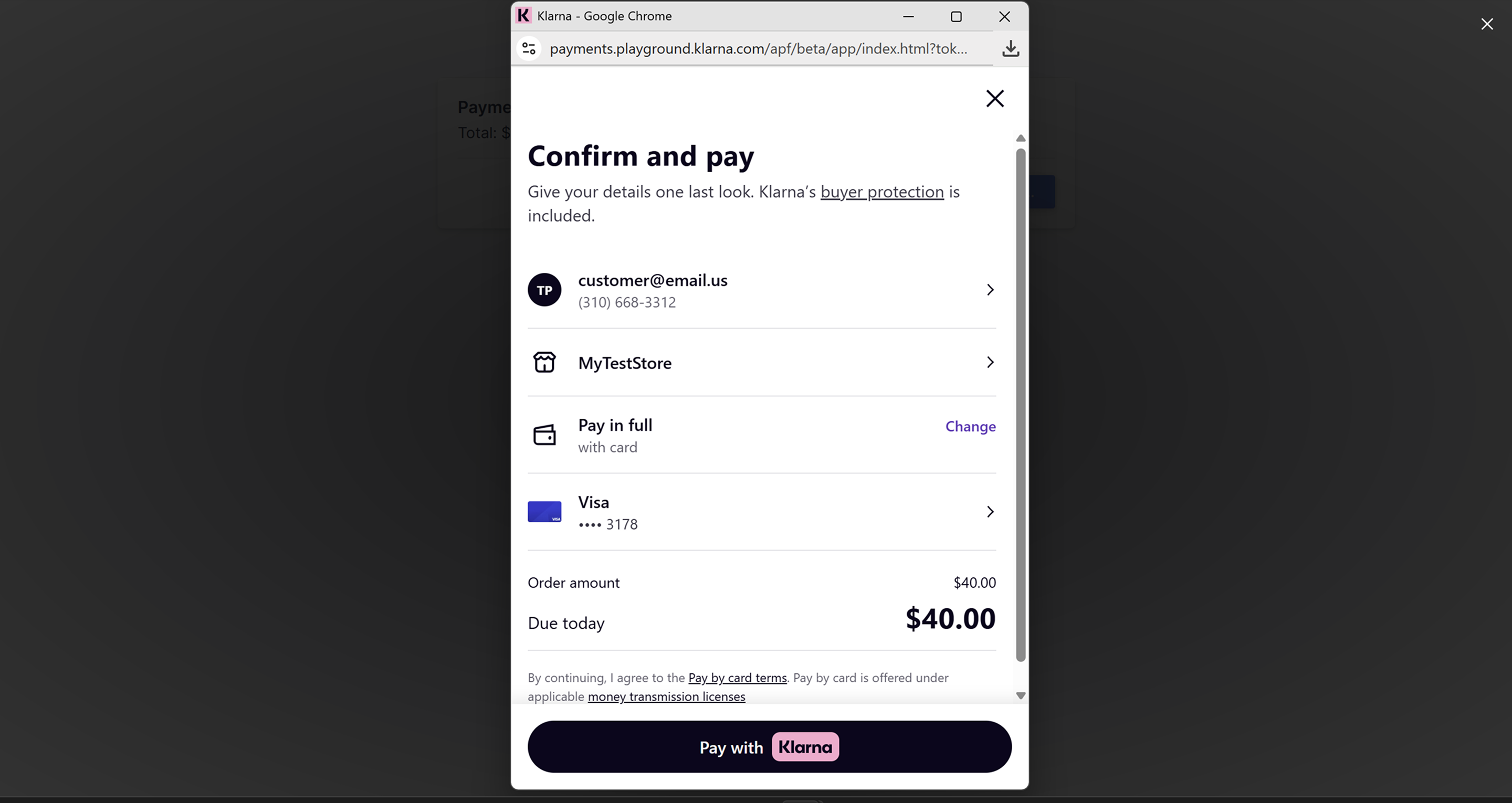
Preview :
Step 1 : Get API Credentials
1. Navigate to the following URL and log in to Klarna Dashboard :
Production / Live : Navigate to the following URL and log in to dashboard :
Sandbox / Test : Navigate to the following URL and log in to dashboard :
https://portal.playground.klarna.com/
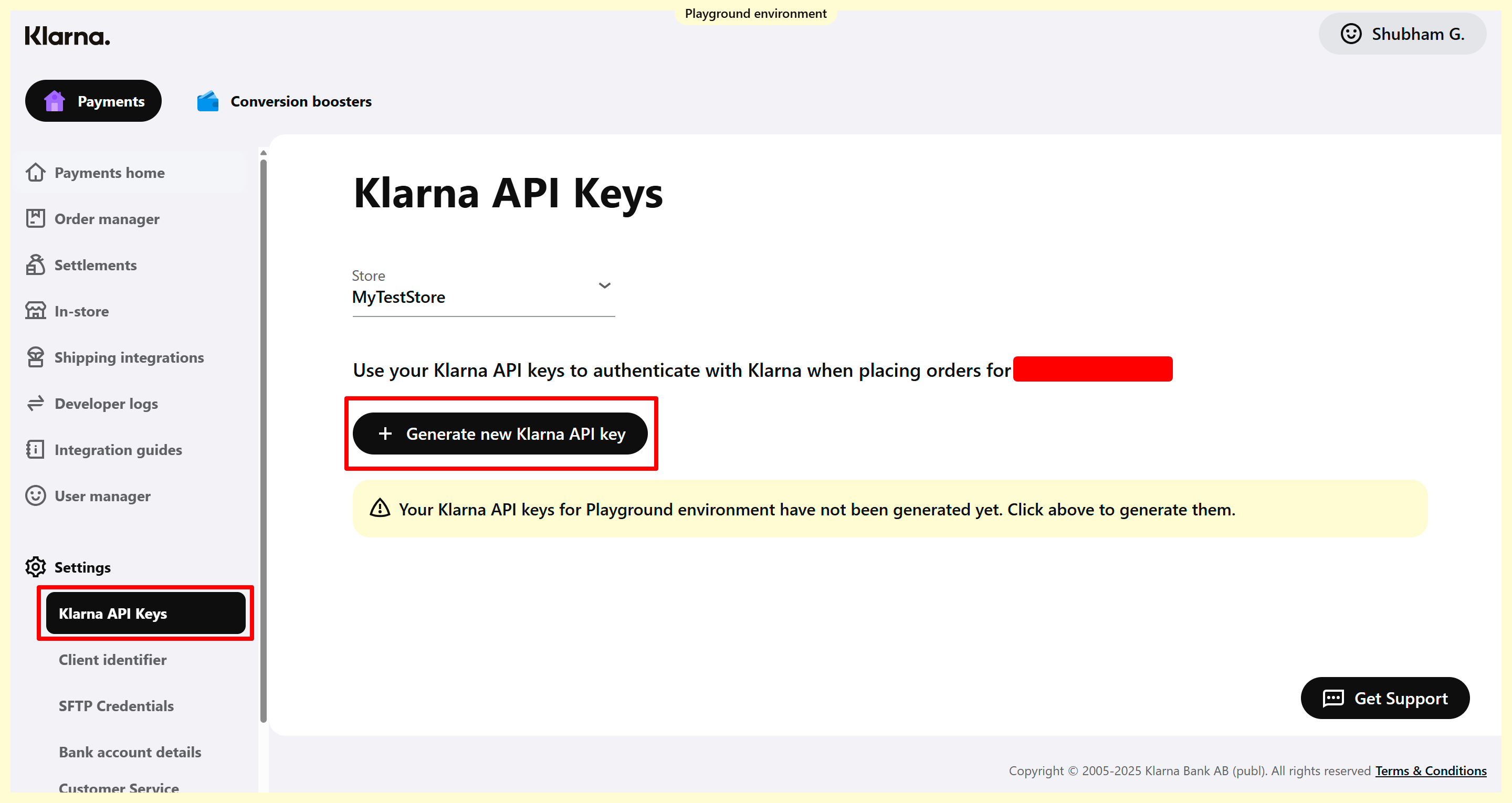
2. After logging in, navigate to the sidebar where you'll find Settings. Click on it to expand the dropdown menu, then select Klarna API Keys
3. Click on Generate new Klarna API key to receive your API credentials. Be sure to download and store them securely
Note : Credentials will only be displayed and available for download once. If lost, you'll need to generate a new set.
Step 2 : Create a Controller.
To create a controller please execute the provided command.
php artisan make:controller PaymentControllerStep 3 : Create Routes.
Next, we'll construct a payment form to gather the necessary details and confirmations from the user. Following this, we'll process the payment. In the callback, we'll verify the payment and determine whether it was successful. So, let's start by creating some routes in the web.php file.
//PAYMENT FORM
Route::get('klarna-payment-form', [\App\Http\Controllers\PaymentController::class, 'index'])->name('klarna-payment-form');
//PROCESS PAYMENT
Route::get('klarna-process', [\App\Http\Controllers\PaymentController::class, 'process'])->name('klarna-process');Step 4 : Payment Form and Processing
We'll create a function named index in PaymentController.php. This function will be responsible for collecting data and executing the generating payment data.
// namespace
use GuzzleHttp\Client;

public function index()
{
    $klarna_username = 'KLARNA_USERNAME';
    $klarna_password = 'KLARNA_PASSWORD';
    $klarna_default_currency = 'USD';
    $klarna_default_country = 'US';
    $klarna_region = 'Europe'; // (Europe, North America, Oceania)
    $test_mode = 1;
    $amount = 40;

    $client_token_data = [
        'username' => $klarna_username,
        'password' => $klarna_password,
        'default_currency' => $klarna_default_currency,
        'default_country' => $klarna_default_country,
        'region' => $klarna_region,
        'test_mode' => $test_mode,
        'amount' => $amount,
        'product_info' => 'INVOICE-' . time()
    ];

    $client_token = $this->getClientToken($client_token_data);

    return view('klarna.index', compact('client_token_data','client_token'));
}Create another function named getClientToken in PaymentController.php, This function will create client token using session API.
public function getClientToken($data)
{
    $klarna_client_token = session()->get('klarna_client_token');
    $session_amount = isset($klarna_client_token['klarna_amount']) ? $klarna_client_token['klarna_amount'] : 0;
    $amount = $data['amount'] * 100;

    if (empty($klarna_client_token) || $session_amount != $amount) {
        $guzzleClient = new Client();
        $username = $data['username'];
        $password = $data['password'];

        $authorizationToken = base64_encode($username . ':' . $password);

        $endpoint = $this->getKlarnaEndpoint($data['test_mode'], $data['region']);

        $response = $guzzleClient->post($endpoint . 'payments/v1/sessions', [
            'headers' => [
                'Authorization' => 'Basic ' . $authorizationToken,
                'Content-Type' => 'application/json',
            ],
            'json' => [
                "acquiring_channel" => "ECOMMERCE",
                "order_amount" => $amount,
                "order_lines" => [
                    [
                        "name" => $data['product_info'],
                        "quantity" => 1,
                        "total_amount" => $amount,
                        "unit_price" => $amount,
                    ]
                ],
                "purchase_country" => $data['default_country'],
                "purchase_currency" => $data['default_currency'],
                "intent" => "buy"
            ]
        ]);

        $result = json_decode($response->getBody()->getContents(), true);

        $client_token = $result["client_token"];
        $session_id = $result["session_id"];

        $session_array = array(
            'klarna_client_token' => $client_token,
            'klarna_session_id' => $session_id,
            'klarna_amount' => $amount
        );

        session()->put('klarna_client_token', $session_array);

        return $session_array;
    } else {
        return $klarna_client_token;
    }
}Create another function named getKlarnaEndpoint in PaymentController.php, This function will manage api endpoint based test mode and region.
public function getKlarnaEndpoint($test_mode, $region)
{
    if ($region == 'North America') {
        if ($test_mode) {
            return 'https://api-na.playground.klarna.com/';
        } else {
            return 'https://api-na.klarna.com/';
        }
    } elseif ($region == 'Oceania') {
        if ($test_mode) {
            return 'https://api-oc.playground.klarna.com/';
        } else {
            return 'https://api-oc.klarna.com/';
        }
    } else {
        if ($test_mode) {
            return 'https://api.playground.klarna.com/';
        } else {
            return 'https://api.klarna.com/';
        }
    }
}Let's create a payment form. To keep it minimal and easy to understand, we'll avoid extra design elements and stick to a simple, basic page.
resources/views/klarna/index.blade.php
<!DOCTYPE html>
<html lang="en">
<head>
    <meta charset="UTF-8">
    <title>Klarna Checkout</title>
    <script src="https://x.klarnacdn.net/kp/lib/v1/api.js" async></script>
</head>
<body>
<div id="klarna-payments-container" style="visibility: hidden;"></div>
<button id="pay-now">Pay Now</button>
<form action="{{ route('klarna-process') }}" method="POST" id="order-form">
    @csrf
    <input type="hidden" id="amount" name="amount" value="{{ $client_token_data['amount'] }}">
    <input type="hidden" id="product_info" name="product_info" value="{{ $client_token_data['product_info'] }}">
    <input type="hidden" id="authorization_token" name="authorization_token">
</form>
<!-- JQUERY -->
<script src="https://code.jquery.com/jquery-3.5.1.min.js"></script>
<script>
    window.klarnaAsyncCallback = function () {
        Klarna.Payments.init({
            client_token: '{{ $client_token['klarna_client_token'] }}'
        });

        Klarna.Payments.load(
            {
                container: '#klarna-payments-container',
                payment_method_category: 'pay_now'
            },
            {

            },
            function (res)
            {
                console.debug(res);
            }
        );
    };

    document.getElementById('pay-now').addEventListener('click', function () {
        Klarna.Payments.authorize({}, function (res) {
            if (res.approved)
            {
                console.log('Payment authorized:', res);
                // res.authorization_token
                $('#authorization_token').val(res.authorization_token);
                $('#order-form').submit();
            }
            else
            {
                console.error('Payment authorization failed:', res);
            }
        });
    });
</script>
</body>
</html>Head back to PaymentController.php to process payment and capture payment.
// namespace
use Illuminate\Http\Request;


public function process(Request $request)
{
    $authorization_token = $request->authorization_token;

    $klarna_username = 'KLARNA_USERNAME';
    $klarna_password = 'KLARNA_PASSWORD';
    $klarna_default_currency = 'USD';
    $klarna_default_country = 'US';
    $klarna_region = 'Europe'; // (Europe, North America, Oceania)
    $test_mode = 1;
    $amount = $request->amount * 100;
    $product_info = $request->product_info;

    $guzzleClient = new Client();

    $endpoint = $this->getKlarnaEndpoint($test_mode, $klarna_region);
    $finalEndpoint = $endpoint . "payments/v1/authorizations/{$authorization_token}/order";

    $response = $guzzleClient->post($finalEndpoint, [
        'headers' => [
            'Authorization' => 'Basic ' . base64_encode($klarna_username . ':' . $klarna_password),
            'Content-Type' => 'application/json',
        ],
        'json' => [
            "order_amount" => $amount,
            "purchase_country" => $klarna_default_country,
            "purchase_currency" => $klarna_default_currency,
            "order_lines" => [
                [
                    "name" => $product_info,
                    "quantity" => 1,
                    "unit_price" => $amount,
                    "total_amount" => $amount,
                ]
            ]
        ]
    ]);

    $order = json_decode($response->getBody()->getContents(), true);

    if (isset($order['order_id']) && isset($order['fraud_status']) && $order['fraud_status'] === 'ACCEPTED') {
        $captureData = [
            'endpoint' => $endpoint . "ordermanagement/v1/orders/{$order['order_id']}/captures",
            'username' => $klarna_username,
            'password' => $klarna_password,
            'amount' => $amount,
        ];

        $captureResponse = $this->captureOrder($captureData);

        if ($captureResponse['status'])
        {
            session()->forget('klarna_client_token');
            dd('Payment completed successfully.');
        }
        else
        {
            // Sometimes payment gets process but need to verify manually on klarna dashboard.
            session()->forget('klarna_client_token');
            dd('Payment completed, Waiting for confirmation.');
        }
    }
    else
    {
        dd('Payment failed, Please Try Again Later.');
    }
}Now create a final function which is captureOrder in PaymentController.php
public function captureOrder($data)
{
    $guzzleClient = new Client();
    $response = $guzzleClient->post($data['endpoint'], [
        'headers' => [
            'Authorization' => 'Basic ' . base64_encode($data['username'] . ':' . $data['password']),
            'Content-Type' => 'application/json',
        ],
        'json' => [
            'captured_amount' => $data['amount']
        ]
    ]);

    $result = json_decode($response->getBody()->getContents(), true);

    return [
        'status' => isset($result['error_code']) ? false : true,
        'message' => isset($result['error_code']) ? ucwords(strtolower(str_replace('_',' ',$result['error_code']))) : '',
    ];
}Use this data for testing :
Test Phone Number :
Phone Number : +15197438620
Leave A Comment
Related Posts

How to get Razorpay API Keys?

How to implement stripe refund in laravel?
How to implement razorpay subscription in laravel?
How to implement razorpay refund in laravel?

How to Implement SumUp in Laravel?
How to implement square payment gateway in laravel?
How to implement razorpay in laravel?
How to implement coingate payment gateway in laravel?
How to Implement PayU in Laravel?
0 Comments